


Washington Post Select
4.617.33K Reviews
App Specs
- Version
- 1.31.3
- Updated On
- License
- Free
- Downloads
- 1,000,000+
- Developer
- The Washington Post
- Categories
- News & Magazines
- Platform
- Android
Screenshots



 Analysis by AppCompare
If you're anything like me, you love staying informed but hate the clutter of endless news feeds. Enter Washington Post Select, an app that's got me hooked with its sleek presentation and well-curated content. Let's dive into what makes this app a standout choice for news enthusiasts.
What the free price does—and does not—tell you
One practical point deserves attention before you decide: the app is free to download, but it also offers in-app purchases priced from $0.99 to $15.00 per item. That means you can try the app without paying upfront; it does not mean every article or feature is necessarily free. I would treat the download as a way to see whether the reading experience suits you, then check the purchase terms presented in the app before committing to any paid access.
The Washington Post is the developer, and the app sits in the news and magazine category. Its average rating is 4.6 from around 70,000 ratings, with more than 17,000 written reviews and over a million installs. Those figures suggest it has attracted a substantial audience, but they cannot tell you whether its coverage, reading style, or purchase options match your needs. The app is rated Everyone 10+, so it may be appropriate for many younger readers with adult guidance, though news topics themselves can still be serious or upsetting.
I also wouldn’t assume that the amount you spend will be worthwhile simply because you already follow the newspaper elsewhere. If you are comparing app access with a subscription or access you may already have, read the in-app purchase details carefully and make sure you understand what each option covers. The sensible test is not just whether the app looks polished; it is whether the content you want is available in the way you expect at a price you are comfortable with.
Clean Design Meets Intuitive Navigation
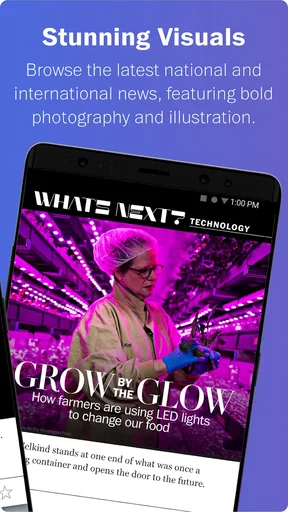
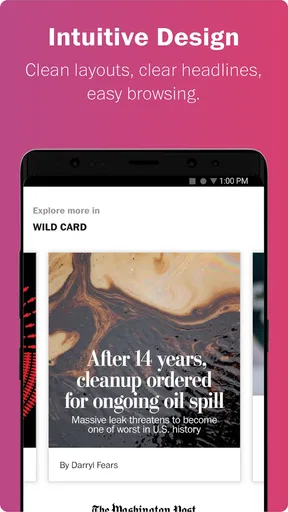
The first thing you'll notice about Washington Post Select is its gorgeous design. It's like the Marie Kondo of news apps—everything is neatly organized, and only the essentials are presented to you. The interface is clean, with a white background that makes the text pop, making it easy on the eyes even during a late-night scroll.
Navigating through the app is a breeze. The tabs at the bottom let you switch between the top stories, personalized recommendations, and saved articles with just a tap. No hunting around for what you need; it's all right there.
Top Stories and Personalized Picks
When it comes to content, Washington Post Select doesn't skimp. The app serves up the top stories of the day, ensuring you're always in the loop about major events. And for those of us who like a bit of customization, the app uses an algorithm to suggest articles based on your reading habits. It’s like having your personal news curator.
Worth Reading Before You Choose

EA SPORTS FC Mobile 26 Is a Bigger Football Game, but It Takes Time

Flipboard Shows What News Apps Must Do Beyond the Feed

Switching to Android Auto Means Rethinking Your Driving Routine

Google Calendar Makes a Crowded Week Easier to Manage

Ludo King Makes the Most of the Minutes Between Plans

Baby Panda World Brings Quick Play to Modern Phones, but Its Game Library Feels Busy
The "For You" section is particularly handy. It's tailored to your interests, so whether you're into politics, technology, or lifestyle, you'll find something that piques your curiosity. The more you read, the smarter it gets, offering articles you might not have found on your own.
How I would use the feed during a busy day
For a quick morning check-in, I’d start with the top stories rather than opening every topic at once. That gives me a broad sense of what matters before I decide where to spend more time. Later, I’d use “For You” to find a story outside my usual routine, while keeping an eye on whether its recommendations are actually useful. Personalization can help surface relevant coverage, but it can also narrow the mix if I only read the same subjects. I’d occasionally choose a top story I wouldn’t normally click to keep my news diet from becoming too predictable.
Saved articles can also make the app more useful than a feed I simply scroll past. If I spot a longer piece between errands, I can save it for a calmer moment rather than trying to finish it while distracted. That small habit works best when I treat saved stories as a short reading queue and clear out pieces I no longer plan to read; otherwise, the list can become another backlog rather than a convenience.
Offline Reading and Easy Sharing
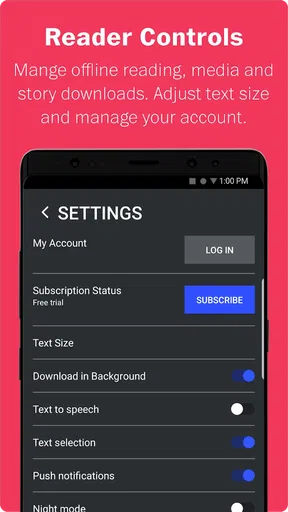
One of the features that truly sets this app apart is the offline reading capability. You can download articles to read later, which is perfect for those moments when you're stuck without Wi-Fi—like on a flight or in a remote location. Just queue up a few articles, and you're set for uninterrupted reading.
Sharing interesting stories is also a cinch. With just a few taps, you can send articles to friends or post them on social media. It's a great way to keep your circle informed or start a conversation about the latest happenings.
A useful routine for reading away from Wi-Fi
Offline access is most valuable when I plan ahead rather than waiting until a connection disappears. Before a commute, flight, or stretch of travel, I’d open the stories I want and make sure they are ready to read. That turns a patchy network into a manageable inconvenience. It is still worth checking the app before leaving, because the feature only helps with stories already made available offline; it is not a substitute for browsing and discovering fresh coverage without a connection.
Sharing is useful for more than posting a headline. If a story could prompt a thoughtful conversation, I’d send it directly to the person likely to care and add a brief note about why I found it relevant. That makes the app a convenient way to pass along reporting, though recipients may encounter access requirements depending on the article and their own access. I wouldn’t assume every shared story will open for everyone in the same way.
Notifications and Custom Alerts
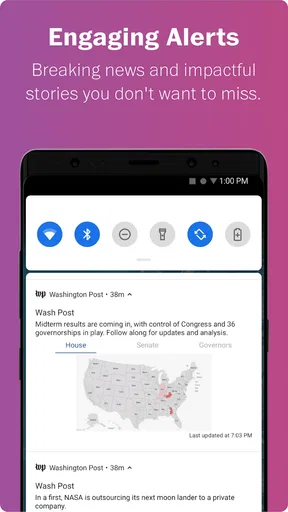
Nobody likes to be bombarded with notifications, and thankfully, Washington Post Select lets you customize alerts to suit your preferences. You can choose to receive push notifications for breaking news or set up alerts for specific topics that interest you. This way, you're only disturbed when it really matters.
It's like having a personal assistant who knows exactly what you want to hear about and when.
Keeping alerts helpful instead of distracting
I’d begin with only the alerts I genuinely want to interrupt my day, then adjust after seeing how they fit my routine. Breaking-news notifications can be useful when a major story is developing, but constant updates can pull attention away from work or family. Topic alerts may be a better middle ground if I care about a subject without needing every headline immediately. The useful distinction is between information I want to see eventually and information I need to know right away.
If alerts feel noisy, turning some off does not mean giving up on the app: the top stories and personalized feed remain places to check when I choose. This is one reason I prefer setting notification preferences deliberately rather than accepting every prompt during setup. A news app should help me stay informed on my schedule, not make every new development feel urgent.
Subscription and Accessibility
Now, let's talk about the subscription model. While the app offers some free content, a subscription is required for full access. It's a bit of an investment, but considering the quality of journalism and the lack of ads, it’s worth it if you're a news junkie like me.
Plus, the app is accessible to everyone, with options for larger text sizes and a dark mode for nighttime reading. It’s clear that a lot of thought has gone into making this app user-friendly for all.
What to weigh against other news options
Compared with a general news aggregator, this app is a more focused way to read journalism from The Washington Post, with its own top stories and reading recommendations rather than a broad mix of publishers. That focus can be a benefit if you already value the publication’s reporting and want a calmer place to follow it. If your main goal is to compare how multiple outlets cover the same event, a multi-source aggregator is likely a better fit; you may prefer to use both, with this app for its own coverage and another source for a wider range of perspectives.
It is also different from simply visiting a newspaper website in a browser. The app’s saved reading, offline capability, personalized picks, and notification controls can make regular reading feel more organized. The trade-off is that a dedicated app adds another place to manage and may place full access behind a purchase. If you only read an occasional story, a browser may be enough; if you return often and use the app’s reading tools, the more structured experience has a clearer purpose.
Who is likely to get the most from it?
I’d recommend trying it if you like checking a concise selection of major stories, want recommendations shaped by your reading, or often save articles for later. It should suit readers who prefer one publisher’s reporting experience and appreciate having top stories, personal picks, and saved pieces close together. The app is available for devices running Android 4.2 or later, and its current version is 1.31.3, so those details are useful to check when deciding whether an older device is suitable.
I’d be more cautious if you need a neutral, all-publisher news dashboard, dislike personalized feeds, or expect complete access without paying. Readers who follow many publications may be better served by a news aggregator, while someone who reads only a headline now and then may not need a dedicated app at all. The best fit depends on how often you read and whether this particular publication is one you want to return to.
For a realistic everyday test, I’d install it before a normal workday, scan the top stories with breakfast, save one article for the commute, and leave only the most useful alert enabled. After a few days, I’d ask whether the recommendations are helping me find worthwhile reporting and whether I am actually using the saved and offline options. That gives a more honest sense of value than judging the app by its first screen alone.
One point I would check before relying on it is whether the articles I most want to read are accessible under the purchase arrangement I choose. The free download makes it easy to explore, but the presence of in-app purchases means access and cost deserve a deliberate look. I would not pay just because I like the interface; I would pay only if the reporting and reading habits I develop make the expense worthwhile to me.
In a world where information is at our fingertips, Washington Post Select stands out by offering a refined experience without the overwhelm. Whether you're a casual reader or someone who devours news like there's no tomorrow, this app has something for you.
So, if you're tired of sifting through endless articles and want a more personalized news experience, give Washington Post Select a try. It's not just another news app; it's your gateway to staying informed, effortlessly.
Pros
- Clean and user-friendly interface.
- High-quality journalism and articles.
- Customizable news notifications.
- Offline reading mode available.
- Timely updates on breaking news.
Cons
- Limited access without subscription.
- Some ads in the free version.
- Occasional app performance lags.
- Content may be U.S.-centric.
- Requires internet for full features.
FAQs for Washington Post Select
What is Washington Post Select and how does it differ from the standard Washington Post app?
Washington Post Select is a curated version of the Washington Post app designed to deliver top stories and a streamlined reading experience. Unlike the standard app, which offers comprehensive access to all news and articles, Select focuses on providing a handpicked selection of must-read stories and features for users who prefer a more concise news update.
Is Washington Post Select available on both Android and iOS devices?
Yes, Washington Post Select is available for download on both Android and iOS platforms. Users can easily find it on the Google Play Store for Android devices and the Apple App Store for iOS devices. This ensures a seamless experience across multiple devices, providing access to top news stories wherever you are.
Does Washington Post Select require a subscription to access all features?
While Washington Post Select offers some content for free, accessing the full range of articles and features typically requires a subscription. Subscribers can enjoy unlimited access to all curated stories, along with additional benefits such as exclusive content and fewer ads, enhancing the overall reading experience.
How often is content updated on the Washington Post Select app?
Content on Washington Post Select is updated multiple times throughout the day to ensure users have access to the latest news. The app focuses on delivering the most important and trending stories, allowing users to stay informed with up-to-the-minute updates and breaking news alerts.
Can I customize the types of news stories I receive on Washington Post Select?
Yes, Washington Post Select allows users to personalize their news feed. By setting preferences and selecting topics of interest, users can tailor the app to focus on the types of stories they care about most, ensuring a more relevant and engaging news consumption experience.


